Skip to content
Waiter & order-taker app

Take the order at the table. It is in the kitchen before you turn around.

The DineBills app puts the full menu, the table map and the kitchen in your waiter’s pocket. Orders go straight to the right station, bills print from the table, and the phone buzzes when the food is ready.

  • iOS and Android
  • Phones and tablets
  • Same menu as the POS
  • Offline queue
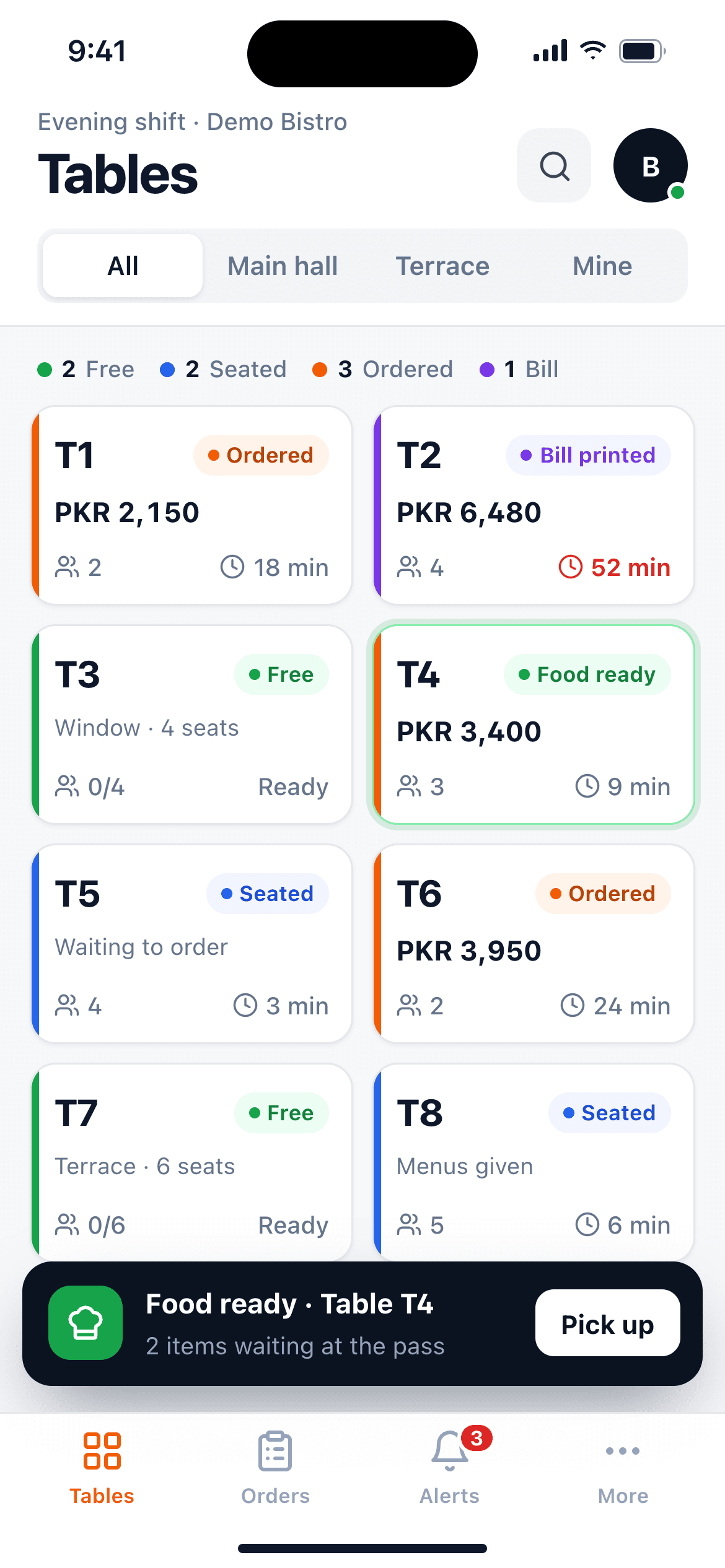
Waiter app on a phone showing the table map with free, occupied and ordered tables
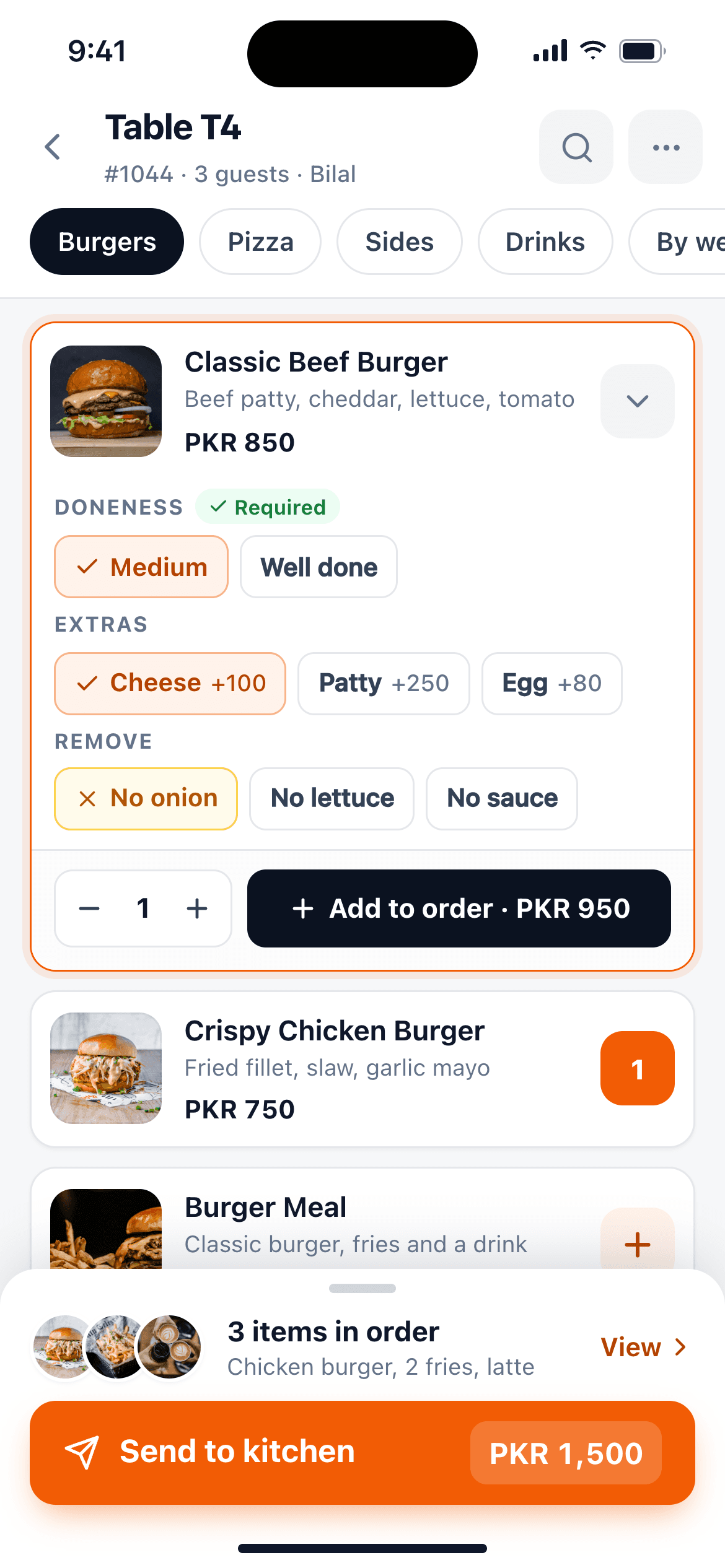
Waiter app order screen with items, modifiers, a running total and a Send button
To send an order to every kitchen station
1 tap
To send an order to every kitchen station
Phones and tablets you already own
iOS + Android
Phones and tablets you already own
Menu, modifiers and routing as the POS
Same
Menu, modifiers and routing as the POS
Orders held on the phone if Wi-Fi drops
Queued
Orders held on the phone if Wi-Fi drops
Table map

See every table, and whose it is.

Waiters see their assigned sections with each table’s status: free, seated, ordered, bill printed or paid. Tap a table to open it, add guests and start the order.

  • Assigned sections per waiter
  • Live status shared with the POS
  • Guest count and table notes
Full ordering

Every modifier, combo and note, on a phone.

The app uses the same menu as the POS, so required choices, nested modifiers, deals and item notes all work the same way. Send to the kitchen with one tap and the tickets are routed exactly as they are from the till.

  • Modifiers, nested modifiers and deals
  • Item and order notes
  • Send to kitchen with the same routing as the POS
  • Split the bill and print it at the table
On the floor

Fewer trips to the till. More time with guests.

The whole service happens at the table: order, fire, bill and pay. The kitchen and the pass stay in the loop.

Food-ready alerts

The phone buzzes the moment the kitchen bumps it.

Bills at the table

Print on a Bluetooth printer you carry.

Seats and courses

Order by seat. Fire mains when the table is ready.

Wi-Fi drops?

Orders wait on the phone and send when it is back.

Why table-side ordering

Fewer trips. Fewer mistakes. Faster tables.

When the order is entered where it is taken, nothing gets lost between the notepad and the till.

Less walking

No trip to the terminal after every table. Servers stay on the floor.

No rewriting

Modifiers are chosen from the menu, not scribbled, so the kitchen gets exactly what the guest asked for.

Faster turns

The kitchen starts earlier, food arrives sooner and the table is free for the next guests.

Tablet counter mode

Open a second till in thirty seconds.

On a tablet the app becomes a full counter ordering screen with category tabs and item tiles, just like the POS. Use it to bust the lunch queue, run a pop-up counter or take orders in the drive-thru lane.

  • Same item grid and modifier flow as the desktop POS
  • Line busting and drive-thru order taking
  • Orders land in the same kitchen queue
In the app

Everything a server needs, one-handed.

Bottom tabs for Tables, Orders, Notifications and More. Large targets. Built for walking and talking at the same time.

PIN login

Pair the device once with a code from the back office. Staff sign in with their own PIN.

Send to kitchen

One KOT per station, to a printer, a kitchen screen or both, exactly like the POS.

Food-ready alerts

A push notification when the kitchen bumps the order, plus kitchen messages.

Bluetooth printing

Print the bill from the table on a Bluetooth or network thermal printer.

Split bill

Split by item or equally before you print.

Offline queue

If the Wi-Fi drops, orders wait on the phone and go to the kitchen on reconnect.

Tablet counter mode

Put the app on a tablet at the counter for a second till during the rush.

Drive-thru and line busting

Walk the queue or the drive-thru lane and take orders before guests reach the counter.

Pay at the table

Tap-to-pay at the table, plus reservations, waitlist and guest notes.

Frequently asked questions

Still curious? Talk to our team.

Which phones and tablets does the app run on?

The app runs on iPhone and iPad (iOS) and on Android phones and tablets. You can use devices you already own; there is no special handheld to buy.

What happens if the restaurant Wi-Fi drops?

Orders are saved on the device and queued. As soon as the connection is back, they are sent to the kitchen in order, and the POS stays the source of truth for payments.

Can waiters print the bill from the table?

Yes. The app prints to Bluetooth thermal printers and to network printers on the same Wi-Fi, so a waiter can print the bill at the table or at a nearby station.

Does it use the same menu as the POS?

Yes. Menu, prices, modifiers, deals and sold-out items come from the same back office, so the app and the till never disagree.

Can I use it as a counter till?

Yes. Tablet mode turns the app into a counter ordering screen, which is handy for a second line during the rush or for drive-thru line busting.

Give every server a till in their pocket.

Install the app on your team’s phones, pair them from the back office and take your next table-side order today.

No credit card required · Setup help included · Cancel anytime